Saturday, August 22, 2009

9 things you'll love about Snow Leopard

Steve Jobs first announced Mac OS X 10.6 (Snow Leopard) was in development at Apple's Worldwide Developers Conference (WWDC) in 2008. It was a chance for Apple to take stock of where it was with OS X. There would be no major innovations, but plenty of refinements: it would install quicker, take up less disk space, and the user experience would be improved through Apple's attention to detail.

Fast forward to WWDC 2009, and the version of Snow Leopard being prepared has everything Apple promised, and more. Refinement rather than revolution, then, is the watchword for Snow Leopard. We've picked out our top nine of those elegant tweaks and finesses – plus a few more for good measure – to show you what Apple's latest big cat has to offer.

1. Improved Finder

So many of the improvements in Snow Leopard are under the skin, but because they affect the parts of the operating system we use most, we'll experience real, long-term benefits when we use them. Take Finder, for instance.

We use the Finder every time we use our Mac, so doesn't it make sense to rewrite its underlying code to optimise it for the latest technologies, such as 64-bit processing? Well, that's exactly what Apple has done with Snow Leopard.

In a direct comparison with Leopard, Snow Leopard's Finder does seem a little more eager to respond; it's only a matter of milliseconds to be sure, but an improvement nonetheless.

Improvements have also been made when it comes to ejecting external drives and optical discs. For instance, if you inadvertently leave a file from one of your disks open, you no longer see the cryptic error message that says: "The disk...is in use by another application". In Snow Leopard, Finder actually tells you what application it is, and advises you to quit it.

2. Smarter QuickTime X

Like Finder, QuickTime in Snow Leopard has been optimised to take full advantage of 64-bit.

In addition, it now uses the capabilities of the Nvidia GeForce 9400M integrated graphics processor (found in such Macs as the MacBook, MacBook Pro and Mac mini) to decode videos compressed using the H.264 standard.

This in turn frees up the main processor in your Mac for other tasks. As of Snow Leopard, QuickTime Player also reaches version X. Not only does it launch quicker than before (Apple claims up to 2.8 times faster), but it looks different – very different.

Gone is the brushed aluminium skin, and in comes a slick, minimalist interface with media controls (play, pause, fast forward, and so on) that fade out of view when you don't need them. And that's not all: need to make a training video for your colleagues on a hot new application? No problem: choose File > New Screen Recording and do it!

You can even perform basic video editing using the Trim feature (in the Edit menu), and upload your video directly to iTunes, your MobileMe Gallery or YouTube.

3. Polished Preview

We've said before that Preview is the hidden gem of Mac OS X. Starting out as a humble image viewer, its feature set now goes way beyond showing previews of printed pages. For instance, have you ever tried to copy and paste text from a PDF into a word processor and found that the PDF's formatting gave you more work than if you'd just retyped the whole thing?

Well, no more: Apple has added a little bit of artificial intelligence to recognise that, say, the text in your PDF is arranged in columns. It enables you to select what you need.

What if you want to annotate your PDF before you send it to your colleagues? No problem: click Annotate in Preview's toolbar, and a comprehensive set of annotation tools appears along the bottom of the application window, enabling you to add callout arrows, text boxes and highlights to make your point.

Open multiple PDFs and you can view them all in a single window (like a contact sheet in Photoshop), allowing for a quick comparison. And it doesn't stop there: you can now scan images directly into Preview, adding yet another tool to what's already a Swiss Army Knife of an app.

4. Refined Address Book and iCal

For another example of the 'refinement rather than revolution' policy adopted by Apple for Snow Leopard, look no further than Address Book. The Sharing and LDAP options in Preferences are now combined into a single Accounts pane, which now allows you to set up syncing with Google as well as Yahoo and MobileMe.

For Google Contacts users, this is a welcome recognition by Apple that there are online contact managers other then MobileMe; though, of course, this option has previously been available to iPhone users. We set up syncing with MobileMe and (separately) with Google, and found the syncing experience pretty seamless.

All you need to do is enter your email address and password, and everything is done for you. There was a bit of a glitch when we tried syncing with Google, which left our contacts without an email address listed in Address Book as No Name, but other than that we were impressed.

The big news when it comes to syncing, however, is Snow Leopard's built-in support for Microsoft's Exchange Server 2007.

5. Better screen grabbing

Whether you're emailing a technical support helpdesk or helping out a Mac newbie it's great to be able to take a few shots of your Mac's screen by simply hitting Cmd + Shift + 3. But how often have you looked forlornly for that one grab that makes your point succinctly, only to find it mingling with others labelled Picture...?

No more: Snow Leopard labels your grabs with the date and time they were taken, making it much simpler to find the one you want. While we're on the subject of refinements, we'd have liked to have seen an option here to change the default target folder for screenshots. Saving multiple grabs to the Desktop makes for a lot of clutter, unless you move each one in turn as you take them.

Luckily, there are applications such as the free TinkerTool that lets you make this change. The equivalent Terminal command also still works in Snow Leopard. And don't forget, you needn't stop at still images: with QuickTime X you can record all the activities taking place on your screen and edit them into a training video.

6. More refined Stacks options

The changes made to Stacks are a prime example of Apple's strategy of refinement rather than revolution for Snow Leopard. Stacks is the feature – introduced as one of the '200 innovations' in Leopard – that enables you to click on a folder in the Dock and see your files expand, fan-like, so that you can pick out the one you need. Which is great, unless you have a large number of files to choose from.

Even if you choose to have your Stack open as a grid or a list (which you can do by clicking and holding on the Stack icon, then choosing the appropriate option), you might still see a message that there are more files to view in Finder. Open that same Stack in Snow Leopard and you'll see that things are different: by the simple addition of a scrollbar to the open Stack, Apple has made the feature much more useable.

And the refinements don't stop there: if there's a folder nested inside your main Stack, it will also open as a Stack rather than switching to a Finder window. And you'll find a handy back arrow in the top-left corner of your open Stack so that you can easily find your way back where you came from.

7. Exposé is now in the Dock

Exposé allows you to view all the open windows in the current application, or across the whole system, with a single keystroke. All those keystrokes, however, can be time-consuming if you need to switch to a different application before using Exposé on the new app's open windows.

What if you know which application you need to switch to? Wouldn't it be great to switch applications and use Exposé at the same time? Well, now you can. With Exposé now, simply click and hold an app's icon in the Dock and all open windows in that application will separate, enabling you to switch windows. And press Tab while Exposé is active in order to move to the next application in the Dock and activate Exposé on that.Application windows are spring-loaded, so you can drag and drop items between them.

8. Access all areas

More often than not, Macs have been the choice of those who need assistance with their hearing or vision, and Snow Leopard builds on that history with a powerful set of enhanced features. VoiceOver is Mac OS X's built-in screen reader, speaking text and commands for partially sighted users. This now has a better startup tutorial with practical examples.

VoiceOver now allows you to fine-tune the speaking voice's settings, including speed, pitch and intonation. Also for partially sighted users, Snow Leopard introduces a feature called Braille mirroring. This enables multiple USB Braille displays to be connected to one computer simultaneously. This is a highly practical for classroom settings, where different students are likely to have different makes and models of Braille display.

Snow Leopard includes the drivers for more than 40 different models of Braille reader, including Bluetooth displays. More new accessibility features include Quick Nav. This uses arrow key combinations to move the VoiceOver cursor so you can control a Mac using one hand. Move up, down, left, and right by pressing the arrow keys individually, or press the up and down arrows together to press a button or click a web link.

9. New System Preferences tools

Again, there are lots of thoughtful little touches in Snow Leopard's System Preferences, though no huge surprises. One really nice touch is the inclusion of new mapping technologies in the Time Zone option of the Date & Time preference pane. This uses Core Location technology, that makes use of Wi-Fi hotspots to set your time zone automatically – perfect for the forgetful globetrotter.

In Security > General, if you've set up a password to wake your Mac from Sleep mode, you can now set a time delay of between five seconds and four hours before you need to enter your password. The International pane in System Preferences is also gone now, replaced by Language & Text. This is, admittedly, almost the same as Leopard's International, but with the addition of a Text pane.

This is similar to the useful AutoCorrect feature that's in Microsoft Word, enabling you to set up custom shortcuts for your most commonly used words and phrases for use in applications such as Mail, TextEdit and iChat. In order to set this feature up in the relevant application, however, you'll first need to go to Edit > Substitutions > Text Replacement.

Oh yes, and just for good measure, you can now shuffle through a selection of your favourite screensaver pictures by choosing the Screen Saver option in the Desktop & Screen Saver pane.

Google accused over Android Skype app block

Hits back, saying no one has made a proper VoIP app yet anyway

According to a USA Today story, Google tried to block Skype - like Google Voice, a way to avoid expensive carrier fees for phone calls - from its Android Market earlier this year.

Dodgy dealing?

Instead of the full Skype application, owners of Android phones instead got Skype Lite, which sends calls not over Skype's potentially free VoIP network, but across the regular phone network at a cost.

The trickiness lies in how that came about - USA Today suggests it's due to some underhanded deal between Google and US Android carrier, T-Mobile. If it were true, it might make it look at least a little foolish in its tussle with Apple over Google Voice on the iPhone.

Clear and simple

However, Google has hit back to deny any suggestions of impropriety. Writing on the Public Policy Blog, Google VP Andy Rubin explained his side of the argument:

"Here are the facts, clear and simple: While the first generation of our Android software did not support full-featured VoIP applications due to technology limitations, we have worked through those limitations in subsequent versions of Android, and developers are now able to build and upload VoIP services."

No VoIP anyway

He goes on to brand USA Today as plain "wrong" and to add that, "at this point no software developer - including Skype - has implemented a complete VoIP application for Android."

So, in other words Google is all for users installing proper VoIP applications on Android and making free or cheap phone calls, but there's actually no way to do so anyway, so it doesn't really matter. Yet.

Twitter tells airlines people are not cattle

Social networking used to give voice to customer complaints


Next time you have an unsatisfactory customer-service experience, instead of complaining to the company concerned, it might be beneficial to let it all out on Twitter.

That's the line of action being encouraged by consumer-rights groups fed up with some pretty shoddy treatment from big businesses.

Let it all out

Chief among the examples cited by Reuters this week is the approach taken to the notorious US airline industry by groups like FlyersRights.org.

While posting messages about bad experiences that read like elementary school graffiti - "Screw american airlines. Every plane has Been broken. Gah. So done", for example - may not seem useful, public venting does seem to be working.

Left to stew

FlyersRights founder Kate Hanni is meticulously documenting and tweeting reports of airlines abusing their hold over passengers in such matters as bumping them off flights and keeping entire plane-loads waiting on the runway overnight.

She explains: "It creates an awareness for people that these things are happening all the time. When I hear about a stranding event where someone is stranded right then, I tweet it."

So, it is useful...

On the back of such negative publicity, FlyersRights is pushing for US legislation to protect airline passengers from abuse. If successful, perhaps naysayers will then stop deriding Twitter as just another internet fad.

Via Reuters

11 ways Apple can kill Spotify on iPhone

It could be the iPhone's killer app. Here's how to kill it


Everybody loves Spotify, and its impressive iPhone app is currently sitting on an Apple desk waiting to be rubber-stamped or rejected.

So what can Apple do to kill it? Could iTunes on the iPhone/iPod be better, and are there any Spotify tricks Apple should nick? Here are eleven ways Apple can beat the European upstart.

1. Start offering an iTunes subscription service

You know it, we know it, Steve Jobs knows it: the musical wind is changing, and in the not too distant future the idea of paying to own music will seem as quaint as having a giant handlebar moustache and travelling by Penny Farthing.

Apple's interested in hardware, not software, and a subscription service won't harm iPod or iPhone sales. Quite the opposite: we can easily imagine The Kids going crazy for an iPhone 3GS with an unlimited music subscription built into the monthly data plan.

2. Add wireless syncing to iTunes

Spotify's Wi-Fi synchronisation is very nifty, and it's something we've wanted to see the iPhone do since day one. And no, MobileMe doesn't count. Apple got rid of the dock ages ago. Surely it's time to get rid of the USB cable, too?

Wi-Fi sync

SYNCING FEELING: Syncing via Wi-Fi is an excellent idea, and we can't think of any reason why iTunes shouldn't do it

3. Stream everything in iTunes

Spotify's playlist is big, but at 6 million-odd tracks it's nowhere near as comprehensive as iTunes' selection of over ten million songs - and Spotify might not have permission to stream all of that catalogue, either: earlier this week, Spotify had to remove Bob Dylan's stuff until such time that it can prove it has the rights to stream his music.

4. Cache content

What makes Spotify on the iPhone so desirable is its caching: you can download playlists to your phone and cache all the songs, enabling you to play them back even when your iPhone's in airplane mode. A subscription version of iTunes could and should do the same.

5. Make offline available online

For those of us in places where 3G coverage ranges from patchy to completely non-existent, such as "pretty much anywhere that isn't a city", it'd be extremely handy to have an offline mode that works independently of our phones' cellular radios.

Spotify offline

6. Tell the networks to get stuffed

Some iPhone apps are crippled for no other reason than phone operators don't like them - so for example Skype is Wi-Fi only. A streaming iTunes needs 3G connectivity to be worthwhile, and as Spotify's demonstrated you can deliver 3G streaming with excellent sound quality.

7. Go social

Unlike Spotify, iTunes is a one-person system. The iPhone's support for peer to peer networking makes Spotify-style playlist sharing perfectly possible, and of course in MobileMe Apple already has a solid data sharing system that iTunes could plug into.

8. Offer it to Americans

Spotify isn't available in the US yet, and that's an awfully big market. If Apple beats Spotify to the US, Spotify's going to have a hard time fighting back - assuming, that is, that record labels are willing to play ball. US labels aren't entirely happy about Apple's market dominance; will they really want to make Apple even more powerful?

9. Don't let anyone multitask

The iPhone OS won't let third-party applications multitask, and while that's attracted criticism it does mean Spotify is damaged, possibly fatally. The iPod app keeps playing when you do other things with your iPhone. The Spotify app can't.

iPhone multitasking

APPLE ONLY: Here's something only Apple applications can do: keep on going when you're doing something else

10. Hang on a bit

Despite the hype, Spotify is losing massive amounts of money. As long as its investors are happy it'll keep going, but sooner or later they're going to expect to see a return on their investment. The internet is littered with the corpses of sites and services that simply ran out of money, and Spotify could turn out to be one of them.

11. Keep Spotify locked in the App Store approval dungeon, refusing to let anybody know whether it's going to be approved or not, thereby making other developers think twice about attempting to create anything vaguely musical for the iPod and iPhone - and keep on doing it until everyone at Spotify hurls themselves off a bridge in despair.

Apple wouldn't do that… would it?


Motorola starting 4G phone trials next year

Working with Japan's number-two wireless operator


motorola-phone

Motorola is ready to start work on 4G networks and hardware


Motorola announced this week that it is working with a major mobile phone network operator to begin trials of LTE, or 4G, technology by the middle of next week.

The US giant is working with long-time Japan partner KDDI on a Long-Term Evolution deployment to begin testing next year with a view to a commercial rollout in 2012.

Nokia ahead of the game

Motorola's 4G scheming follows soon after hardware competitors Nokia and Ericsson announced they will start work on LTE development in the US with Verizon Wireless.

The Japanese 4G work will rely heavily on methods and hardware developed at its LTE laboratory in Swindon that opened in February this year.

Google rivals oppose book project

Microsoft, Yahoo! and Amazon have joined forces to challenge Google's efforts to create a vast virtual library.


The technology giants have signed up to the Open Book Alliance, a division of the Internet Archive organisation comprised of library associations and other not-for-profit groups, to challenge the terms of the Google Books project.

Google Books aims to digitise millions of novels, reference books and notable works of literature, making them searchable online. Google has struck deals with author groups and publishers, agreeing to share revenue from advertising and subscriptions with these rights holders. The Internet Archive is also involved with the digitisation of books, and has scanned more than 1.5 million titles so far.

However, other organisations have argued that the Google Books deal, which is awaiting court approval, gives Google an unfair advantage in the book digitisation space, and makes it difficult for other companies to offer similar services or to compete with the Google offering.

Gary Reback, an antitrust lawyer representing the Alliance, said that they planned to make a representation to the US Department of Justice arguing that the agreement is anti-competitive.

"This deal has enormous, far-reaching anti-competitive consequences that people are just beginning to wake up to,” he said.

In 2008, Google reached an agreement with publishers and writers to settle legal proceedings which accused the search giant of infringing copyright by scanning and digitising books without authorisation.

To settle the complaints, Google paid $125 million to launch the Books Rights Registry, which would ensure authors and rights holders could register their works and receive financial recompense. The deal also saw Google granted the right to digitise so-called "orphan" books, titles for whom rights holders are either unknown or untraceable, and which account for around 50 per cent of all books published since 1923.

"Google is trying to monopolise the library system," Brewster Kahle, founder of the Internet Archive, told the BBC. "If this deal goes ahead, they're making a real shot at being 'the' library and the only library.

"The techniques we have built up since the enlightenment of having open access, public support for libraries, lots of different organisational structures, lots of distributed ownership of books that can be exchanged, resold and repackaged in different ways – all of that is being thrown out in this particular approach."

Critics have also expressed concerns over user privacy, and say that Google has not given satisfactory assurances about whether data about people's reading habits will be collected and stored, and whether it will be used to provide other products or services.

However, Google said that the book digitisation project bought huge benefits, preserving out-of-print or hard-to-find books and making them easily accessible to the masses.

"The Google Books settlement is injecting more competition in to the digital books space, so it's understandable why our competitors might fight hard to prevent more competition," said Google in a statement.

Google wants to help you Listen to the web while on the go

Good news, Androids. Google Labs has busted out a new podcast / web audio-centric app, Listen, for your droiding pleasure.

In particular, Listen from Google Labs:

lets you search, subscribe, download and stream. By subscribing to programs and search terms it will create a personalized audio-magazine loaded with fresh shows and news stories whenever you listen. In this release Listen is indexing thousands of popular English-only audio sources.

Google Listen joins Doggcatcher, another podcatcher, in bringing podcasts to your ‘droid. However, besides the fact that Doggcatcher isn’t free (whereas Listen costs nothing), the biggest difference between the two is, well, Google being Google. Where Doggcatcher requires users to enter in the particular RSS feeds they want to follow, Listen allows users to search for any and all podcasts / other web audio from across the Nets.

listen_screenshot_homeFor example, say you want to learn more about oh, I don’t know…healthcare. Or perhaps you’re interested in listening to something slightly less controversial, say NFL pre-season analysis. With Listen, you’d simply enter in some keywords (”public option” / “Washington Redskins”) and “press on a result to start listening right away or press and hold (long-press) to see more options.”

Not only can you search and subscribe to podcasts, but you can also create playlists with the “My Listen Queue” feature. Listen also works with Bluetooth headsets.

At the moment, Listen is available only for Android-powered devices and is limited to English-only audio podcast.

Apple’s Response To The FCC: We Didn’t Reject The Google Voice App, We’re Still Looking At It

Apple has responded to our request for a follow-up on AT&T’s statement to the FCC. Of note, Apple is saying that it hasn’t actually rejected the Google Voice app, but that it didn’t accept the version submitted because it was too similar to the iPhone’s functionality. Here’s the key blurb:

Contrary to published reports, Apple has not rejected the Google Voice application, and continues to study it. The application has not been approved because, as submitted for review, it appears to alter the iPhone’s distinctive user experience by replacing the iPhone’s core mobile telephone functionality and Apple user interface with its own user interface for telephone calls, text messaging and voicemail.

Here’s another key part:

Apple is acting alone and has not consulted with AT&T about whether or not to approve the Google Voice application. No contractual conditions or non-contractual understandings with AT&T have been a factor in Apple’s decision-making process in this matter.

But the same is not true for streaming TV app or VoIP apps (which Google Voice is not), which Apple does reject on AT&T’s behalf:

There is a provision in Apple’s agreement with AT&T that obligates Apple not to include functionality in any Apple phone that enables a customer to use AT&T’s cellular network service to originate or terminate a VoIP session without obtaining AT&T’s permission. Apple honors this obligation, in addition to respecting AT&T’s customer Terms of Service, which, for example, prohibit an AT&T customer from using AT&T’s cellular service to redirect a TV signal to an iPhone. From time to time, AT&T has expressed concerns regarding network efficiency and potential network congestion associated with certain applications, and Apple takes such concerns into consideration.

Here’s the full statement, warning, this is long.

Today Apple filed with the FCC the following answers to their questions.

We are pleased to respond to the Wireless Telecommunications Bureau’s inquiry dated July 31, 2009, requesting information regarding Apple’s App Store and its application approval process. In order to give the Bureau some context for our responses, we begin with some background information about the iPhone and the App Store.

Apple’s goal is to provide our customers with the best possible user experience. We have been able to do this by designing the hardware and software in our products to work together seamlessly. The iPhone is a great example of this. It has established a new standard for what a mobile device can be—an integrated device with a phone, a full web browser, HTML email, an iPod, and more, all delivered with Apple’s revolutionary multi-touch user interface.

Apple then introduced something altogether new—the App Store—to give consumers additional functionality and benefits from the iPhone’s revolutionary technology. The App Store has been more successful than anyone could have ever imagined. Today, just over a year since opening, the App Store offers over 65,000 iPhone applications, and customers have downloaded over 1.5 billion applications.

The App Store provides a frictionless distribution network that levels the playing field for individual and large developers of mobile applications. We provide every developer with the same software that we use to create our own iPhone applications. The App Store offers an innovative business model that allows developers to set their own price and keep more (far more in most cases) of the revenue than traditional business models. In little more than a year, we have raised the bar for consumers’ rich mobile experience beyond what we or anyone else ever imagined in both scale and quality. Apple’s innovation has also fostered competition as other companies (e.g., Nokia, Microsoft, RIM, Palm and Verizon) seek to develop their own mobile platforms and launch their own application stores.

Apple works with network providers around the world so that iPhone users have access to a cellular network. In the United States, we struck a groundbreaking deal with AT&T in 2006 that gives Apple the freedom to decide which software to make available for the iPhone. This was an industry first.

We created an approval process that reviews every application submitted to Apple for the App Store in order to protect consumer privacy, safeguard children from inappropriate content, and avoid applications that degrade the core experience of the iPhone. Some types of content such as pornography are rejected outright from the App Store, while others such as graphic combat scenes in action games may be approved but with an appropriate age rating. Most rejections are based on bugs found in the applications. When there is an issue, we try to provide the developer with helpful feedback so they can modify the application in order for us to approve it. 95% of applications are approved within 14 days of their submission.

We’re covering new ground and doing things that had never been done before. Many of the issues we face are difficult and new, and while we may make occasional mistakes, we try to learn from them and continually improve.

In response to your specific questions, we would like to offer the following:

Question 1. Why did Apple reject the Google Voice application for iPhone and remove related third-party applications from its App Store? In addition to Google Voice, which related third-party applications were removed or have been rejected? Please provide the specific name of each application and the contact information for the developer.

Contrary to published reports, Apple has not rejected the Google Voice application, and continues to study it. The application has not been approved because, as submitted for review, it appears to alter the iPhone’s distinctive user experience by replacing the iPhone’s core mobile telephone functionality and Apple user interface with its own user interface for telephone calls, text messaging and voicemail. Apple spent a lot of time and effort developing this distinct and innovative way to seamlessly deliver core functionality of the iPhone. For example, on an iPhone, the “Phone” icon that is always shown at the bottom of the Home Screen launches Apple’s mobile telephone application, providing access to Favorites, Recents, Contacts, a Keypad, and Visual Voicemail. The Google Voice application replaces Apple’s Visual Voicemail by routing calls through a separate Google Voice telephone number that stores any voicemail, preventing voicemail from being stored on the iPhone, i.e., disabling Apple’s Visual Voicemail. Similarly, SMS text messages are managed through the Google hub—replacing the iPhone’s text messaging feature. In addition, the iPhone user’s entire Contacts database is transferred to Google’s servers, and we have yet to obtain any assurances from Google that this data will only be used in appropriate ways. These factors present several new issues and questions to us that we are still pondering at this time.

The following applications also fall into this category.

* Name: GVDialer / GVDialer Lite
Developer: MobileMax
info@mobile-mx.com
* Name: VoiceCentral
Developer: Riverturn, Inc.
4819 Emperor Blvd., Suite 400
Durham, NC 27703
* Name: GV Mobile / GV Mobile Free
Developer: Sean Kovacs
sean@seankovacs.com

We are continuing to study the Google Voice application and its potential impact on the iPhone user experience. Google is of course free to provide Google Voice on the iPhone as a web application through Apple’s Safari browser, just as they do for desktop PCs, or to provide its “Google-branded” user experience on other phones, including Android-based phones, and let consumers make their choices.

Question 2. Did Apple act alone, or in consultation with AT&T, in deciding to reject the Google Voice application and related applications? If the latter, please describe the communications between Apple and AT&T in connection with the decision to reject Google Voice. Are there any contractual conditions or non-contractual understandings with AT&T that affected Apple’s decision in this matter?
Apple is acting alone and has not consulted with AT&T about whether or not to approve the Google Voice application. No contractual conditions or non-contractual understandings with AT&T have been a factor in Apple’s decision-making process in this matter.

Question 3. Does AT&T have any role in the approval of iPhone applications generally (or in certain cases)? If so, under what circumstances, and what role does it play? What roles are specified in the contractual provisions between Apple and AT&T (or any non-contractual understandings) regarding the consideration of particular iPhone applications?

Apple alone makes the final decisions to approve or not approve iPhone applications.

There is a provision in Apple’s agreement with AT&T that obligates Apple not to include functionality in any Apple phone that enables a customer to use AT&T’s cellular network service to originate or terminate a VoIP session without obtaining AT&T’s permission. Apple honors this obligation, in addition to respecting AT&T’s customer Terms of Service, which, for example, prohibit an AT&T customer from using AT&T’s cellular service to redirect a TV signal to an iPhone. From time to time, AT&T has expressed concerns regarding network efficiency and potential network congestion associated with certain applications, and Apple takes such concerns into consideration.

Question 4. Please explain any differences between the Google Voice iPhone application and any Voice over Internet Protocol (VoIP) applications that Apple has approved for the iPhone. Are any of the approved VoIP applications allowed to operate on AT&T’s 3G network?

Apple does not know if there is a VoIP element in the way the Google Voice application routes calls and messages, and whether VoIP technology is used over the 3G network by the application. Apple has approved numerous standard VoIP applications (such as Skype, Nimbuzz and iCall) for use over WiFi, but not over AT&T’s 3G network.

Question 5. What other applications have been rejected for use on the iPhone and for what reasons? Is there a list of prohibited applications or of categories of applications that is provided to potential vendors/developers? If so, is this posted on the iTunes website or otherwise disclosed to consumers?

In a little more than a year, the App Store has grown to become the world’s largest wireless applications store, with over 65,000 applications. We’ve rejected applications for a variety of reasons. Most rejections are based on the application containing quality issues or software bugs, while other rejections involve protecting consumer privacy, safeguarding children from inappropriate content, and avoiding applications that degrade the core experience of the iPhone. Given the volume and variety of technical issues, most of the review process is consumed with quality issues and software bugs, and providing feedback to developers so they can fix applications. Applications that are fixed and resubmitted are approved.

The following is a list of representative applications that have been rejected as originally submitted and their current status:

* Twittelator, by Stone Design Corp., was initially rejected because it crashed during loading, but the developer subsequently fixed the application and it has been approved;
* iLoveWiFi!, by iCloseBy LLC, was rejected because it used undocumented application protocols (it has not been resubmitted as of the date of this letter);
* SlingPlayer Mobile, by Sling Media, was initially rejected because redirecting a TV signal to an iPhone using AT&T’s cellular network is prohibited by AT&T’s customer Terms of Service, but the developer subsequently fixed the application to use WiFi only and it has been approved; and
* Lingerie Fantasy Video (Lite), by On The Go Girls, LLC, was initially rejected because it displayed nudity and explicit sexual content, but the developer subsequently fixed the application and it has been approved with the use of a 17+ age rating.

Apple provides explicit language in its agreement with iPhone developers regarding prohibited categories of applications, for example:

* “Applications may be rejected if they contain content or materials of any kind (text, graphics, images, photographs, sounds, etc.) that in Apple’s reasonable judgment may be found objectionable, for example, materials that may be considered obscene, pornographic, or defamatory; and
* Applications must not contain any malware, malicious or harmful code, program, or other internal component (e.g. computer viruses, trojan horses, ‘backdoors’) which could damage, destroy, or adversely affect other software, firmware, hardware, data, systems, services, or networks.”

And we also provide a reference library that can be accessed by members of the iPhone Developer Program that lists helpful information such as Best Practices and How To Get Started.

Question 6. What are the standards for considering and approving iPhone applications? What is the approval process for such applications (timing, reasons for rejection, appeal process, etc.)? What is the percentage of applications that are rejected? What are the major reasons for rejecting an application?

As discussed in the response to Question 5, Apple provides guidelines to developers in our developer agreement as well as on its web site regarding prohibited categories of applications. These materials also contain numerous other provisions regarding technical and legal requirements that applications must comply with, and Apple uses these standards in considering whether or not to approve applications.

Apple developed a comprehensive review process that looks at every iPhone application that is submitted to Apple. Applications and marketing text are submitted through a web interface. Submitted applications undergo a rigorous review process that tests for vulnerabilities such as software bugs, instability on the iPhone platform, and the use of unauthorized protocols. Applications are also reviewed to try to prevent privacy issues, safeguard children from exposure to inappropriate content, and avoid applications that degrade the core experience of the iPhone. There are more than 40 full-time trained reviewers, and at least two different reviewers study each application so that the review process is applied uniformly. Apple also established an App Store executive review board that determines procedures and sets policy for the review process, as well as reviews applications that are escalated to the board because they raise new or complex issues. The review board meets weekly and is comprised of senior management with responsibilities for the App Store. 95% of applications are approved within 14 days of being submitted.

If we find that an application has a problem, for example, a software bug that crashes the application, we send the developer a note describing the reason why the application will not be approved as submitted. In many cases we are able to provide specific guidance about how the developer can fix the application. We also let them know they can contact the app review team or technical support, or they can write to us for further guidance.

Apple generally spends most of the review period making sure that the applications function properly, and working with developers to fix quality issues and software bugs in applications. We receive about 8,500 new applications and updates every week, and roughly 20% of them are not approved as originally submitted. In little more than a year, we have reviewed more than 200,000 applications and updates.

Yammer’s Big Night: Launches Threaded Conversations, Push-Enabled iPhone App, And More


It’s been just under a year since Yammer, the ‘Twitter for businesses’, launched at TechCrunch 50 and won the conference’s top prize. Since then the service has seen steady growth, with over 40,000 networks signed up for the service. It’s also become an absolutely essential tool inside the TechCrunch office, which is why I grew alarmed when I noticed that the service is currently down. But a quick visit to the site’s blog reveals that this was planned downtime, and for good reason: when Yammer comes back up, it will feature a host of impressive features in what may be the service’s biggest update since launch. We got in touch with CEO David Sacks, who outlined what we can expect when the service comes back later tonight.

Some of the new features include:

  • Revamped iPhone App — The big new feature here is Push notifications, which will allow you to get updated whenever you get a message without having to burn through SMS messages. The app also integrates a camera mode for taking photos, improved text entry (you can auto-save drafts and type in landscape mode), and improved performance. The app is currently pending approval in the app store, so we may have to wait a few more days to download it.


  • Likes — Yammer is adopting the feature popularized by Friendfeed and later “borrowed” by Facebook. However, Likes in Yammer aren’t just virtual pats on the back — every time you Like something, it will be shared with everyone in your network, which means that Liked messages grow virally.


  • Threads — You’ll now be able to view messages in a threaded view, in a manner that looks very similar to Facebook, or you can revert back to the Twitter-like stream Yammer has used until now. The stream works fine for small groups, but it can become unwieldly when multiple conversations are going on at once, which makes the threaded view a welcome addition. For now this will be limited to the web version, but the desktop client will support it in the next few weeks.


  • Improved Search — Search has been improved to include a number of advanced options, including limiting searches to a specific user or to coworkers in a certain group.

Other improvements include more security options (you can make passwords automatically expire after a certain time period), a ‘broadcast’ mode for network admins that lets them send a message throughout an entire network, and an improved interface.

All in all this is a great update for Yammer, which continues to improve on an already-solid product. Last month Yammer unveiled a rebuilt client for Adobe AIR, which was also a big improvement over the old app. That said, I could do without AIR’s quirks — I wish Yammer offered some native clients.

Yelp Launches Bing-Powered Blackberry App


We’ve written about the many iterations of Yelp’s iPhone app and today, Yelp has broadened its mobile horizons by launching the much awaited Blackberry Yelp app. You can download it here.

Similar to the iPhone app, the Blackberry app uses location-aware technology to determine your current location and will then let you search for nearby businesses, read reviews and access a moveable map, which is powered by Bing rather than Google. This is interesting considering the maps feature on the iPhone app is powered by Google Maps. Yelp says that Bing was used because the search engine provided map tile access, which was essential for movable maps on the app.

The app lets you zoom in and out on a location and then change your search based on that geographic area. Yelp says the Blackberry app works in the US, Canada and the UK (which is everywhere Yelp is available).

A spokeswoman for Yelp told us that the Blackberry app doesn’t have as many bells and whistles as the current version of the iPhone app. It appears that this version of the app is most similar to the version 1 of the iPhone app. Yelp says that the Blackberry app will continue to be updated with new features in the future.

As we’ve said in the past, Yelp keeps rolling out new iPhone apps with powerful and noteworthy features. In April, they released Version 2 and added the ability for users to leave reviews on local businesses, giving people the ability to post reviews directly from their iPhone.

Version 3, which we wrote about a few weeks ago, adds a few more compelling features, including a “Sales And Offers Near You” feature which lets users find deals that are physically close to them. You can sort by distance (in blocks), price, whether the business is open right then, or by neighborhood. Businesses can add special offers for free on their business page.

Yelp has made a strong move in the mobile space, and this latest app is representative of its ambitions to broaden its horizons. Perhaps an Android app is next?

App Store Exposed: Notes Of Interest From Apple’s Statement To The FCC

59060621_984ef4d84dNow that all of the letters to the FCC have been filed by Apple, AT&T and Google, we’re more carefully reading them over for interesting details. The Apple letter would seem to have the most interesting information, as it controls the App Store, and has given some new information about it. Here are some interesting tidbits.

On general app rejections:

We created an approval process that reviews every application submitted to Apple for the App Store in order to protect consumer privacy, safeguard children from inappropriate content, and avoid applications that degrade the core experience of the iPhone. Some types of content such as pornography are rejected outright from the App Store, while others such as graphic combat scenes in action games may be approved but with an appropriate age rating. Most rejections are based on bugs found in the applications. When there is an issue, we try to provide the developer with helpful feedback so they can modify the application in order for us to approve it.

On the app approval rate:

95% of applications are approved within 14 days of their submission.

On the Google Voice rejection:

Contrary to published reports, Apple has not rejected the Google Voice application, and continues to study it. The application has not been approved because, as submitted for review, it appears to alter the iPhone’s distinctive user experience by replacing the iPhone’s core mobile telephone functionality and Apple user interface with its own user interface for telephone calls, text messaging and voicemail.

Apple has a problem with Google Voice’s phone icon, voicemail functionality and SMS functionality:

Apple spent a lot of time and effort developing this distinct and innovative way to seamlessly deliver core functionality of the iPhone. For example, on an iPhone, the “Phone” icon that is always shown at the bottom of the Home Screen launches Apple’s mobile telephone application, providing access to Favorites, Recents, Contacts, a Keypad, and Visual Voicemail. The Google Voice application replaces Apple’s Visual Voicemail by routing calls through a separate Google Voice telephone number that stores any voicemail, preventing voicemail from being stored on the iPhone, i.e., disabling Apple’s Visual Voicemail. Similarly, SMS text messages are managed through the Google hub—replacing the iPhone’s text messaging feature.

Apple believes Google Contacts may be a security risk:

In addition, the iPhone user’s entire Contacts database is transferred to Google’s servers, and we have yet to obtain any assurances from Google that this data will only be used in appropriate ways. These factors present several new issues and questions to us that we are still pondering at this time.

On a Google Voice web app:

Google is of course free to provide Google Voice on the iPhone as a web application through Apple’s Safari browser, just as they do for desktop PCs, or to provide its “Google-branded” user experience on other phones, including Android-based phones, and let consumers make their choices.

On AT&T’s role in the Google Voice app rejection:

Apple is acting alone and has not consulted with AT&T about whether or not to approve the Google Voice application. No contractual conditions or non-contractual understandings with AT&T have been a factor in Apple’s decision-making process in this matter.

On Apple’s approval process with regards to its partners:

Apple alone makes the final decisions to approve or not approve iPhone applications.

But, Apple does reject apps on AT&T’s behalf that are VoIP or streaming video apps (like SlingBox):

There is a provision in Apple’s agreement with AT&T that obligates Apple not to include functionality in any Apple phone that enables a customer to use AT&T’s cellular network service to originate or terminate a VoIP session without obtaining AT&T’s permission. Apple honors this obligation, in addition to respecting AT&T’s customer Terms of Service, which, for example, prohibit an AT&T customer from using AT&T’s cellular service to redirect a TV signal to an iPhone. From time to time, AT&T has expressed concerns regarding network efficiency and potential network congestion associated with certain applications, and Apple takes such concerns into consideration.

But VoIP apps are okay over WiFi:

Apple has approved numerous standard VoIP applications (such as Skype, Nimbuzz and iCall) for use over WiFi, but not over AT&T’s 3G network.

A bit more on rejections:

Most rejections are based on the application containing quality issues or software bugs, while other rejections involve protecting consumer privacy, safeguarding children from inappropriate content, and avoiding applications that degrade the core experience of the iPhone.

On what takes up most of app reviewers time:

Given the volume and variety of technical issues, most of the review process is consumed with quality issues and software bugs, and providing feedback to developers so they can fix applications.

The number of App Store reviewers:

There are more than 40 full-time trained reviewers, and at least two different reviewers study each application so that the review process is applied uniformly.

Apple now has an App Store executive review board that meets once a week:

Apple also established an App Store executive review board that determines procedures and sets policy for the review process, as well as reviews applications that are escalated to the board because they raise new or complex issues. The review board meets weekly and is comprised of senior management with responsibilities for the App Store.

On the amount of applications that get submitted:

We receive about 8,500 new applications and updates every week, and roughly 20% of them are not approved as originally submitted. In little more than a year, we have reviewed more than 200,000 applications and updates.

All of this information sheds some light on the mystery that has been the App Store. As we’ve noted, the approval process has seemed to improve since Senior VP Phil Schiller got personally involved. It seems likely that he’s on or even leading this App Store executive review team, though Apple doesn’t say that.

The Truth: What’s Really Going On With Apple, Google, AT&T And The FCC


Apple has responded to the FCC’s request for information around its rejection of various Google and third party iPhone applications for the iPhone.

In short, Apple denies that they rejected the Google Voice application, but they go into great detail about how the Google Voice application hurts “the iPhone’s distinctive user experience.” All of those statements are either untrue, or misleading, or both.

The first part of Apple’s argument, that they never rejected the application, is “a total lie,” according to many sources with knowledge of the Google Voice application process.

The second part of Apple’s argument, that the Google Voice application hurts the iPhone’s distinctive user experience, is seriously misleading. I know this because I’ve become intimately familiar with the Google Voice service and applications over the last few months. See here, here, here and here, for example. I haven’t used the Google Voice app for the iPhone specifically, because it never launched. But I have been briefed by the Google team on two separate occasions on how the app would work over the last couple of months. Also, I’ve demo’d the Blackberry version of the app, and now use the Android version of the app.

Here’s the key language from Apple’s letter, with my comments:

Apple: “Contrary to published reports, Apple has not rejected the Google Voice application, and continues to study it.”

Reality: One third party Google Voice app developer disclosed to us in July that Apple SVP Phil Schiller told them that Google’s own app would be or already was rejected. Google also confirmed this to us later. There is overwhelming evidence that Apple did in fact reject the application.

Apple: “The application has not been approved because, as submitted for review, it appears to alter the iPhone’s distinctive user experience by replacing the iPhone’s core mobile telephone functionality and Apple user interface with its own user interface for telephone calls, text messaging and voicemail. Apple spent a lot of time and effort developing this distinct and innovative way to seamlessly deliver core functionality of the iPhone.”

Reality: This strongly suggests that the Google Voice app replaces much of the core Apple iPhone OS function. This certainly isn’t accurate, and we believe the statement is misleading. More details below, but in general the iPhone app is a very light touch and doesn’t interfere with any native iPhone apps at all.

Apple: “For example, on an iPhone, the “Phone” icon that is always shown at the bottom of the Home Screen launches Apple’s mobile telephone application, providing access to Favorites, Recents, Contacts, a Keypad, and Visual Voicemail. The Google Voice application replaces Apple’s Visual Voicemail by routing calls through a separate Google Voice telephone number that stores any voicemail, preventing voicemail from being stored on the iPhone, i.e., disabling Apple’s Visual Voicemail.”

Reality: Not true and misleading. The Google Voice application has its own voicemail function, which also transcribes messages. But it only works for incoming Google Voice calls, not calls to the iPhone. The Google Voice app in no way “replaces” Apple’s voicemail function.

Apple: “Similarly, SMS text messages are managed through the Google hub—replacing the iPhone’s text messaging feature.”

Reality: Not true and misleading. The Google Voice app doesn’t replace or in any way interfere wtih the iPhone’s text messaging feature. If someone sends a text message to your Google Voice number, the Google Voice app shows it. If it is sent directly to the iPhone phone number, nothing is different.

Apple: “In addition, the iPhone user’s entire Contacts database is transferred to Google’s servers, and we have yet to obtain any assurances from Google that this data will only be used in appropriate ways. These factors present several new issues and questions to us that we are still pondering at this time.”

Reality: Complete fabrication, way beyond misleading. The Google Voice app can access the iPhone’s contacts database, like thousands of other iPhone apps. But the Google Voice app never syncs the contacts database to their own servers. There is no option for users to do this. However, Apple offers the ability to sync iPhone contacts with Google via iTunes. So not only is Apple’s statement untrue, but they also provide this exact feature themselves via their own service.

So how did Google answer the same question in their own separate letter to the FCC, also made publicly available today? We don’t know, because Google requested that the answer be redacted. But my guess is that the answer, which the FCC has and can compare to Apple’s response, tells a significantly different (approximately the exact opposite) story:

Our sources at Google tell us in no uncertain terms that Apple rejected the application. And we have an independent third party app developer who tells us that an Apple Exec also told them back in July that the Google Voice Application was rejected.

In other words, there is strong evidence that Apple is, well, lying.

Which also is the easiest was to explain Apple’s long rambling letter to the FCC. Why go into so much detail about the problems with the Google Voice application, and then say that it was never rejected? If the app does actually replace all of those core apple phone, contact and SMS features, why not reject it out of hand? I don’t believe anyone would say Apple made the wrong decision if that laundry list of nonsense had any truth to it (we have an answer to that, below).

Multiple sources at Google tell us that in informal discussions with Apple over the last few months Apple expressed dismay at the number of core iPhone apps that are powered by Google. Search, maps, YouTube, and other key popular apps are powered by Google. Other than the browser, Apple has little else to call its own other than the core phone, contacts and calendar features. The Google Voice App takes things one step further, by giving users an incentive to abandon their iPhone phone number and use their Google Voice phone number instead (transcription of voicemails is reason enough alone). Apple was afraid, say our sources, that Google was gaining too much power on the iPhone, and that’s why they rejected the application.

Apple seemed to be fine telling Google and others that the real reason they wouldn’t accept the Google Voice app on the iPhone was a fear of being turned into little more than a hardware manufacturer over time as users spent more and more time on Google Voice and less time on the competing native iPhone apps. Or simply letting people believe that AT&T was behind the rejection. Until the FCC got involved, that is. Then Apple denied the rejections and directed the FCCs attention to misleading or simply untrue factual statements about the App.

Of course, now both Google and AT&T are required to tell their side of the story to the FCC, too. And those stories aren’t adding up.

What Happens Next?

Here’s what we believe Apple is preparing to do next. Their statement that they haven’t rejected the app, along with the long laundry list of complaints (none of which are true) tells us that they’re backtracking, and fast. Sometime soon, we guess, Apple will simply accept the Google Voice application. They have to - any serious investigation into the app by the FCC will show that the complaints around the app are unfounded and that it does none of the things Apple accuses it of doing. So Apple will save face by simply asking Google to ensure that the App doesn’t take over native phone, sms and other functions, and doesn’t sync the contacts to Google’s servers. Google will comply (they already have), and Apple will graciously accept the application.

But we’ll all know exactly where Apple stands - jealously guarding control of their users and trying to block Google and other third party developers at every turn from getting their superior applications in front those users.

This isn’t about protecting users, it’s about controlling them. And that’s not what Apple should be about. Put the users first, Steve, and don’t lie to us. We’re not that dumb.

Tuesday, August 18, 2009

TwitVid Launches First Twitter Video Application For The BlackBerry


TwitVid, the easy way to share videos straight to Twitter, released the first video Twitter application on the Blackberry App World for free. [App World URL] TwitVid will easily allow users to upload video from their mobule phones to TwitVid, just like in the iPhone application.

With the BlackBerry TwitVid application, TwitVid hopes to expand its overall market share for video sharing on Twitter. When atebits released Twitter for Mac, they partnered with ImageShack, the guys behind yFrog, to bring video recording integration into Tweetie. It doesn’t look like Tweetie will be adding Twitvid anytime soon, although the two are “in talks.”

But TwitVid did announce two new partnerships with other mobile Twitter apps; one with UberTwitter, and the other with Twitterrific from The Icon Factory. With both applications, TwitVid is the default video uploading service. UberTwitter recently started putting advertising in its app, which was the most popular Blackberry application for Twitter, until its received quite the backlash from the community.

A number of celebrities have also started using TwitVid as well, including Dane Cook, Mary J Blige, Ciara, Chris Daughtry, Baron Davis, Al Yankovic, David Blaine, Greg Grunberg, Stephen Fry and Dwight Howard, to name a few.

Co-Founder and COO of TwitVid, Mo Al Adham, mentioned that over the past month, the number of videos uploaded to the site have increased more than 17x, and the number keeps growing. TwitVid hopes to become one of the main options for uploading video to Twitter.

image001

What Are These Bars On My iPhone? Wait, You Mean AT&T Is Working?!


Over the weekend I noticed something odd going on with my iPhone: It was working! That is to say I actually had signal in the SoMa district of San Francisco, which is something that I had basically given up on long ago. But it was working, and it was actually solid 3G service. Still, I chalked it up to a fluke. I had been screwed over by AT&T too many times to get my hopes up. Maybe everyone in SoMa was just out of town, I thought.

But a few more days past as people started telling me they were noticing the same thing. It would go in and out at certain times, but for the most part, AT&T’s network actually seemed to be working in the area. Were we all going crazy? No, says AT&T, who I contacted to today to see what was going on that my service was actually working. “Improvements are underway,” is what I was told by a representative of the company after he asked around.

“Most of this is 850 MHz spectrum being added.” That is inline with recent reports about upgrades for AT&T GSM network. But those upgrades were scheduled to start in Atlanta first, as I said, I’m in San Francisco. I don’t want to get anyone’s hopes up (most of all mine), but it looks like AT&T may actually be taking the steps necessary to get its network working in the areas where service is particularly bad.

I’m told that this upgrade process (at least in San Francisco) will be continuing over the coming weeks. When that’s complete, AT&T is offering to give us a walk through of the big changes they’re making to improve the network that we rip at just about every chance we get (which I think is fair, given what we pay for the service). I’m cautiously optimistic on this. Has anyone else been noticing better service on their iPhones or any other AT&T device? Let us know in the comments.

Yahoo BOSS Might Be Bigger Than Bing

One of the least appreciated, but smartest, moves Yahoo has made in the past year is to launch Yahoo BOSS, its open search APIs which lets developers create their own custom search engine using Yahoo’s algorithms. We use it to power search across the TechCrunch network. And we are not alone. It has become immensely popular.

By last May, Yahoo BOSS was serving up 30 million search queries a day. You can see the rapid growth in search volume in the chart above, which comes from a Technology Review profile of Vik Singh, the 24-year-old engineer who was one of the main champions behind Yahoo BOSS. (He is one of Technology Review’s 2009 Innovators Under 35)

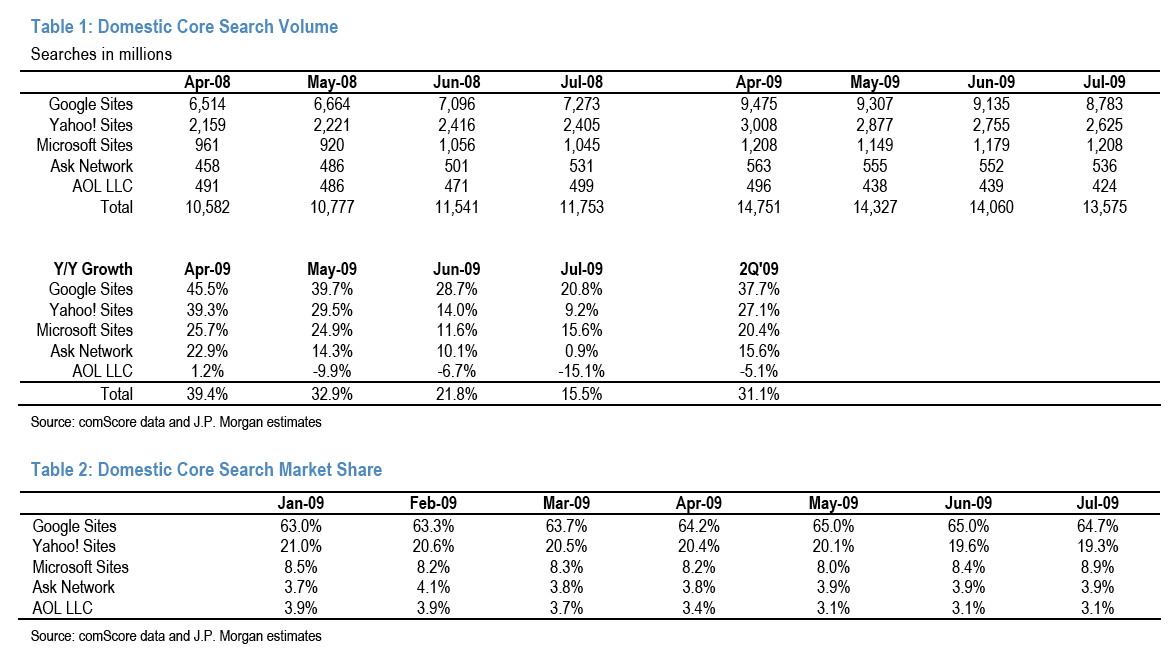
At 30 million queries a day, that comes out to about 900 million queries a month, which would make Yahoo BOSS the fourth largest search engine in the U.S. with about a 6 percent share. That is just below the 9 percent share (and 1.2 billion queries a month) comScore estimates for Bing.

But that is based on data from April. The chart is missing the last three months because Yahoo won’t update the numbers (I asked). Depending on the growth rate of Yahoo BOSS search queries since then, BOSS should now either be at par with Bing or even slightly larger. Between February, 2009 and April, 2009, search queries grew 50 percent (from 20 million a day to 30 million). Here are three different growth scenarios for the period May through July and the corresponding search volume numbers they would imply:

    Growth Scenarios
  1. 50 percent growth = 45 million queries a day = 1.35 billion queries a month
  2. 40 percent growth = 42 million queries a day = 1.26 billion queries a month
  3. 30 percent growth = 39 million queries a day = 1.17 billion queries a month

Remember, Bing was at an estimated 1.21 billion queries a month for the month of July. So BOSS might very well be as big as Bing. In fact, a couple months before the Bing-Yahoo deal, I kept hearing from people connected to Yahoo that BOSS on its own was bigger than Microsoft search. Now Microsoft owns BOSS as part of its deal to take over Yahoo’s search operations.

On the day the deal was announced, Microsoft SVP Yusuf Mehdi told me that he wants to keep BOSS alive because “there is a lot of goodness there.” I’ll say. It adds about another six points to Bing’s overall search volume market share. (Click the market share table below to enlarge).

july-search-volume-tbale

twitter company profile

Twitter

Twitter, founded by Jack Dorsey, Biz Stone, and Evan Williams in March 2006 (launched publicly in July 2006), is a social networking and micro-blogging service that allows users to post their latest updates. An update is limited by 140 characters and can be posted through three methods: web form, text message, or instant message. The company has been busy adding features to the product like Gmail import and search. They recently launched a new site section called “Explore” for external and third party tools that interact with Twitter and a new visualization tool called Twitter Blocks.

The service was started by Obvious Corp, who also started Odeo.

In April 2008 Twitter launched Twitter Japan in partnership with Digital Garage.

Milestones

  • 6/23/08 — Hires Rudy Winnacker and John Adams, two new Operation Engineers 6
  • 6/9/08 — Survives iPhone 3G Stevenote 7
  • 6/9/08 — Twitter partners with Summize to cover Apple news. 8
  • 5/28/08 — Launches a status blog to communicate to users better about issues with the service. 9
  • 5/7/08 — Twitter Starts Blacklisting Spammers 10
  • 4/24/08 — VP Lee Mighdoll Leaves Twitter 11
  • 4/23/08 — Chief Architect Blaine Cook Leaves Twitter 12
  • 4/22/08 — Twitter Japan Launches 13
  • 4/16/08 — Twitter helps bust American man out of Egyptian jail 14
  • 7/15/06 — Twitter Launches 15
  • 3/21/06 — First Twitter 16

General Information

Websitetwitter.com
Blogtwitter.com/blog
Twitter@twitter
CategoryConsumer Web
Emailpr@twitter.com
Employees29
Founded3/06
DescriptionSocial networking and microblogging

Offices

San Francisco, USA
539 Bryant Street
San Francisco, CA, 94107
USA

People

Product Development
Co-founder & Creative Director
Distributed Systems Architect
Engineer
Operations Manager
Senior Operations Engineer
Operations Manager
Operations Engineer
Lead of User Experience Team
Engineer
Board Member
Engineer
Director of Engineering and Ops
Co-Founder, Chairman
Advisor/Investor
Engineer, User Experience Group
Co-Founder, CEO
General Counsel
Chief Scientist
board of directors
Director of Search

Acquisitions

Values of n, 11/08 1
Summize, 7/08 2

Funding

Competitors

Digg, Pownce, ZYB, Jaiku, Zannel, mocospace, Chatterous, trymehere, Twitturly, TwitterFone, LetsProve, Plurk, Adocu.com, InGameNow, Posterous, Next2Friends, Hictu, kwippy.com, spotengine, Present.ly, Me2day, Xumii, Collecta

Screenshots

Twitter screenshot
Above: Twitter Home Page July 2009
Uploaded: 7/25/09
Twitter screenshot
Above: Twitter Homepage as of July 28, 2009
Uploaded: 7/29/09
Twitter screenshot
Above: Twitter search results page as of July 28, 2009
Uploaded: 7/29/09


courtesy: crunchbase